Creating and Managing Invoices
Invoices represent the formalisation of work.
In WebDev CRM, an invoice records the commercial agreement that confirms work is happening or has been completed. Invoices translate decisions made during quoting into something concrete — a record of what is being billed, when, and to whom.
Invoices can be linked to:
This allows billing to reflect how the work was scoped and agreed.
What an Invoice Is Used For
An invoice allows you to:
-
Request payment for approved work
-
Record what has been billed and when
-
Maintain a clear financial history for a client relationship
-
Keep billing connected to the original scope
Invoices are not isolated documents. They are part of the same workflow that begins with a quote and continues through delivery.
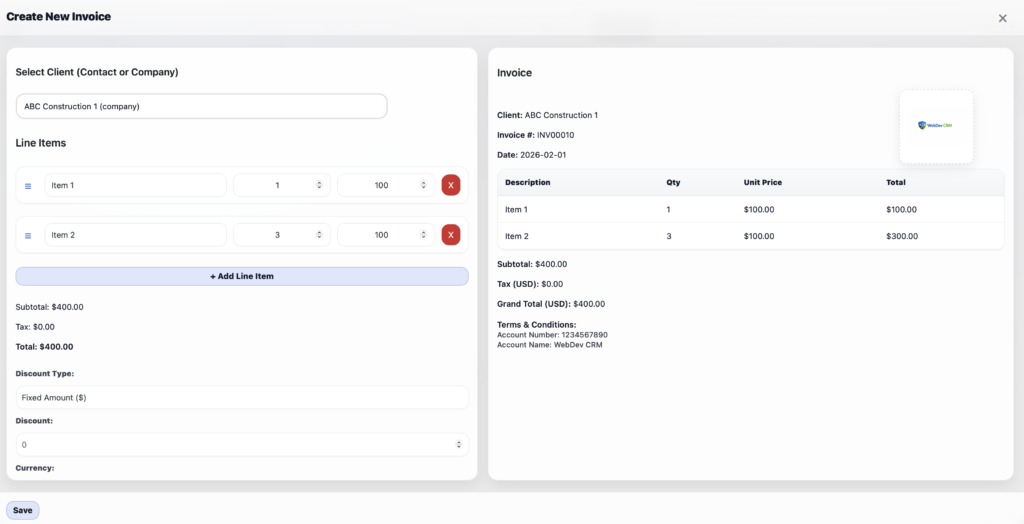
Creating a New Invoice
Invoices can be created directly, or generated from an accepted quote.
To create an invoice manually:
-
1. Navigate to Invoices from the WebDev CRM menu
-
2. Click Add Invoice.
-
3. Select a contact or company
-
4. Enter invoice details such as line items, pricing, currency, tax rate, and invoice terms.
-
5. Save the invoice
-
6. The invoice will appear in the main invoices table as a Draft.

Creating an Invoice from a Quote
When work has been agreed, a quote can be converted into an invoice.
This carries forward commercial details without re-entry and preserves context.
To convert a quote into an invoice:
-
1. Navigate to Quotes from the WebDev CRM menu
-
2. Identify the Quote you want to convert and left-click on the View & Edit button
-
3. Left-click Convert to Invoice

Editing an Existing Invoice
Invoices may need adjustment before being sent.
To edit an invoice:
-
1. Navigate to Invoices from the WebDev CRM menu
-
2. Identify the Invoice you want to edit and left-click on the View & Edit button
-
3. Edit the relevant details
-
4. Save the invoice
Edits apply while the invoice is in draft or pending state. Once issued or paid, invoices remain part of the permanent financial record.

Sending an Invoice
Invoices can be sent directly to the client via email.
Sending an invoice allows you to:
-
Deliver billing information clearly
-
Keep a record of when the invoice was issued
-
Maintain continuity between billing and delivery
To send an invoice:
-
1. Navigate to Invoices from the WebDev CRM menu
-
2. Identify the Invoice you want to send and left-click on the View & Edit button
-
3. Left-click Send Invoice
-
Note 1: A valid email address needs to exist for the client in order to send the invoice
-
Note 2: This guide assumes you have setup SMTP Email in settings with a reputable transactional email provider such as SendGrid or Amazon SES
The invoice remains accessible for follow-up and reference.

Sending a Receipt
Once an invoice is paid, it can be marked as such and a receipt issued.
Receipts provide confirmation that payment has been received and become part of the client’s financial history.
To issue a receipt:
-
1. Navigate to Invoices from the WebDev CRM menu
-
2. Identify the Paid Client Invoice you want to send as a receipt and left-click on the View & Edit button
-
3. Left-click Send Receipt
-
Note 1: A valid email address needs to exist for the client and the status needs to be set to PAID in order to send the receipt
-
Note 2: This guide assumes you have setup SMTP Email in settings with a reputable transactional email provider such as SendGrid or Amazon SES
The receipt remains linked to the invoice, preserving a clear payment trail.

How Invoices Fit Into Client Workflow
Invoices sit at the point where commercial agreement becomes financial reality.
They connect:
-
Backward to quotes, where scope and assumptions were set
-
Forward to projects, where work is delivered
This connection ensures billing decisions remain understandable long after payment is complete.
Managing Invoices Over Time
As client relationships continue, invoices accumulate history.
You can:
-
Review billing across multiple projects
-
Reference past invoices during new discussions
-
Maintain a clear record of payments over time
Invoices become part of the long-term memory of the relationship — not just a transaction.