Creating and Managing Companies
Companies represent the organisations you work with.
In WebDev CRM, a company is a business, brand, or entity that work is delivered for. Companies provide the organisational layer of client workflow, allowing commercial and delivery history to stay connected over time.
Companies are intentionally not linked directly to contacts.
This avoids rigid assumptions about organisational structure and keeps client relationships flexible.
What a Company Is Used For
A company can be linked to:
This allows you to:
-
Group work under a single organisation
-
Track long-running commercial relationships
-
Maintain continuity across multiple projects over time
Companies exist independently, so work can be scoped at an organisational level without forcing individual relationships into a fixed hierarchy.
Creating a New Company
Creating a company establishes an organisation you can reference throughout your workflow.
Steps:
-
1. Navigate to Companies from the WebDev CRM menu.
-
2. Click Add Company.
-
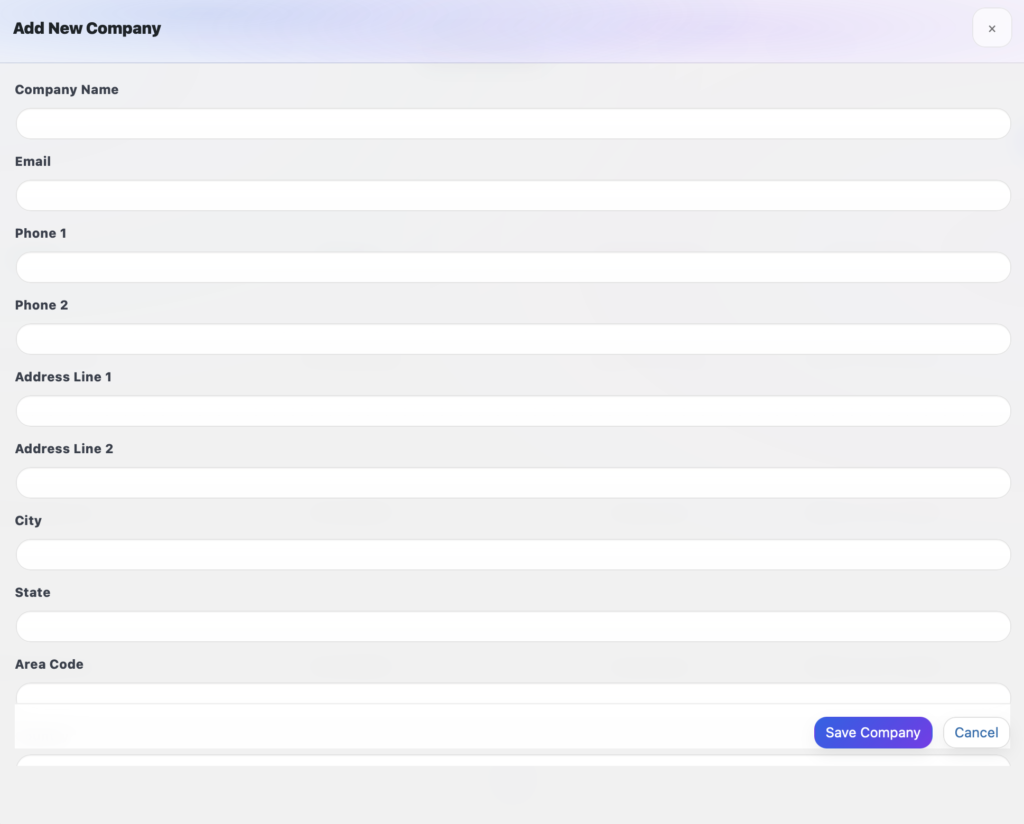
3. Enter the companies details, such as company name, email address, and phone number (Optional - Add Notes or an Attachment).
-
4. Click Save
-
5. The New Company will Appear in the Companies Table.
Editing an Existing Company
Company details can evolve over time. WebDev CRM allows you to update a company without breaking historical context.
Option 1: Inline Editing
Key information for a company exists in the main companies table view which can be edited by following these steps:
-
1. Identify the Company you wish to edit.
-
2. Left-Click on any of the following columns for that specific company: Company Name, Email, Phone 1 and Company Tag.
-
3. Edit the relevant details.
-
4. Click Save (Optionally click cancel should you wish to abort).
-
5. The Companies details have now been saved to the Database.

Option 2: +More Window
Key information for a company exists in the +More Window which can be edited by following these steps:
-
1. Identify the Company you wish to edit.
-
2. Left-Click on the +More button.
-
3. Left-Click on any of the following columns for that specific company inside the +More Window - Company Info Tab: Name, Phone 1, Phone 2, Address 1, Address 2, City/Suburb, State, Area Code, Country and Company Tag.
-
4. Edit the relevant details.
-
5. Click Save (Optionally click cancel should you wish to abort).
-
6. The Companies details have now been saved to the Database.

Using Companies in Quotes, Invoices, and Projects
When creating a quote, invoice, or project, you can assign a company directly.
This ensures:
-
Quotes are scoped to the correct organisation
-
Invoices reference the correct billing entity
-
Projects remain connected to the broader client relationship
Because companies are shared across these areas, you don’t need to recreate organisational details for each piece of work.

Why Companies Are Not Tied to Contacts
WebDev CRM deliberately separates companies and contacts.
This avoids assumptions such as:
-
One company having a fixed set of contacts
-
Individuals always acting on behalf of a single organisation
-
Organisational structures remaining static over time
In real client work, people move roles, consult across businesses, or act independently. Keeping companies and contacts separate allows you to reflect that reality without workarounds or duplicated data.
Managing Companies Over Time
As client relationships mature, companies become part of the long-term record of your work.
You can:
-
Reuse a company across multiple projects
-
Track commercial history across years, not just individual engagements
-
Maintain clarity even as work expands, contracts change, or scope evolves
Companies help preserve organisational continuity, not just billing information.


