Creating and Managing Projects
Projects represent the delivery phase of client work.
In WebDev CRM, a project is where agreed work becomes action. Projects bring together commercial decisions, delivery progress, and client communication into a single, ongoing record.
Projects can be linked to:
This allows you to manage delivery at the appropriate level without forcing a fixed structure.
What a Project Is Used For
A project allows you to:
-
Track work that is actively being delivered
-
Reflect the current state of that work
-
Provide visibility to both internal users and clients
-
Maintain continuity between agreement and execution
Projects are not isolated tasks. They sit downstream from quotes and invoices and remain relevant as work evolves.
Creating a New Project
Creating a project establishes a delivery space for agreed work.
Steps:
-
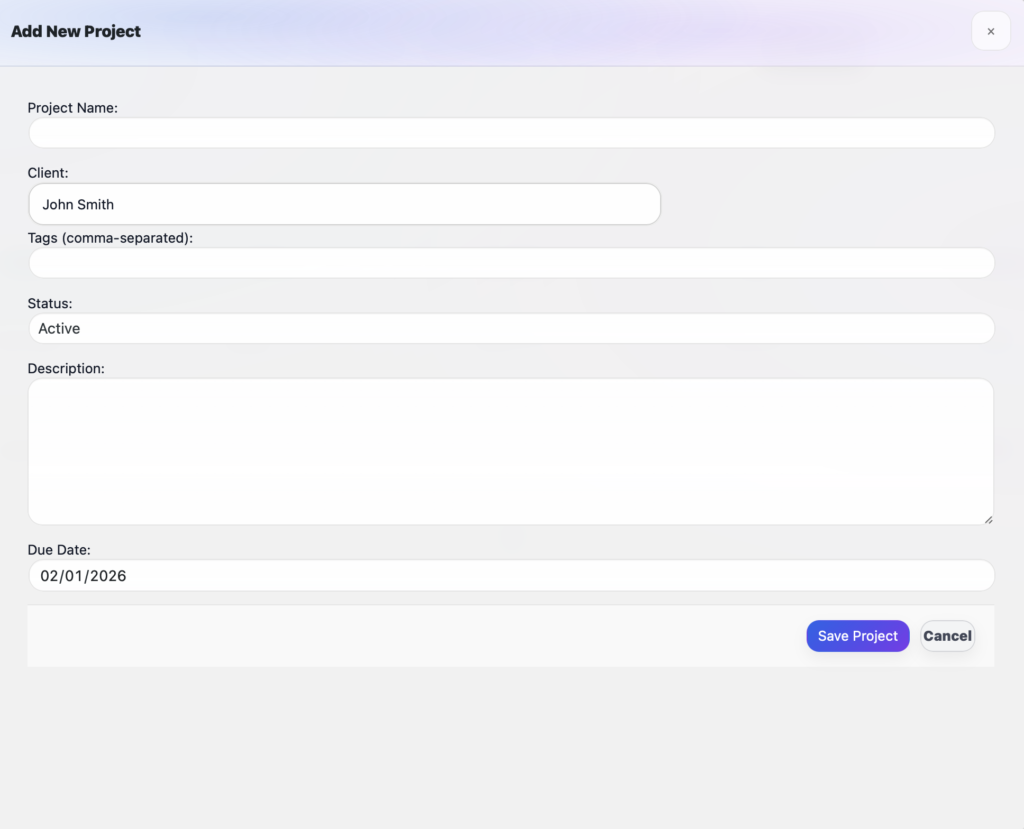
1. Navigate to Projects from the WebDev CRM menu
-
2. Click Add Project
-
3. Select a contact or company
-
4. Enter the project name and relevant details - inclusive of project status Active, On Hold or Complete
-
5. Save the project
-
6. The invoice will appear in the main projects table
Once saved, the project becomes part of the active workflow and can be tracked over time.

Understanding Project Status
Active
The project is currently being worked on.
Active projects appear as in progress in both the admin area and the client portal.
On Hold
The project is paused.
This may be due to client feedback, dependencies, or scheduling. The project remains visible but clearly marked as not currently progressing.
Complete
The project has finished delivery.
Completed projects remain part of the historical record and continue to provide context for future work.
Changing a project’s status updates how it is represented internally and in the client portal.

Tracking Percentage Complete
Projects include a percentage complete indicator.
This allows you to:
-
Reflect delivery progress in a simple, non-technical way
-
Provide clients with clear expectations
-
Avoid relying on vague status updates
The percentage complete is visible internally and shared with clients through the client portal.
How Projects Appear in the Client Portal
Project status and percentage complete are reflected directly in the client portal.
Clients can see:
-
Whether a project is active, on hold, or complete
-
How far along the work is
-
A consistent, up-to-date view of progress
This reduces the need for status emails and check-in messages, while keeping clients informed without exposing internal detail.

Managing Projects Over Time
Projects often evolve.
Scope can shift. Priorities can change. New work can emerge.
By keeping projects connected to contacts, companies, and commercial history, WebDev CRM allows you to manage delivery without losing context.
Completed projects don’t disappear — they become reference points for what came before.